How do I get a bot to answer from my own documents and show where each answer came from?
In Botlit, grounding an assistant in your own documents is handled through Knowledge Bases and Retrieval-Augmented Generation (RAG)
About this answer — Produced by our own assistant on 23 September 2026 from our published documentation. The pages it drew on are linked under the answer. It is generated text, not a statement from a person — where it and a linked page disagree, the page is right.
Answer
In Botlit[1], grounding an assistant in your own documents is handled through Knowledge Bases and Retrieval-Augmented Generation (RAG):
- Ingest and Chunk Documents: Upload your source material (such as policies, guides, or handbooks). Botlit chunks documents using configurable strategies—including recursive, semantic, markdown-aware, or code-aware splitting—and embeds them into a dedicated vector collection.
- Link Knowledge Bases to an Agent: Attach ready knowledge bases to your agent. On each turn, the runtime embeds the user query, retrieves the most relevant passage chunks using semantic search, and injects them into the prompt.
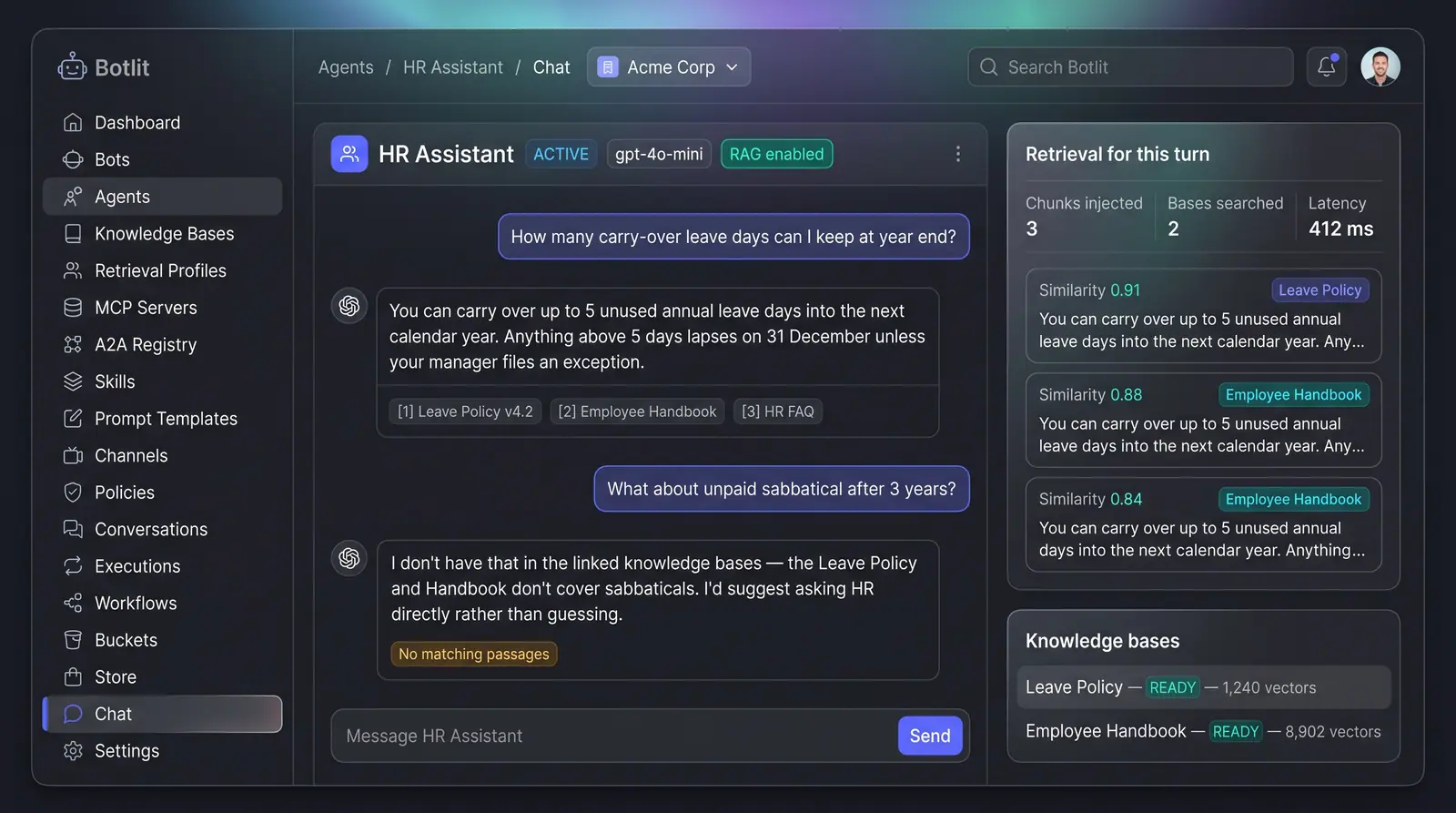
- Enforce Grounded Answers: Agents receive explicit instructions to answer strictly from the retrieved context and say so honestly—declining with a "No matching passages" notice—if the documentation does not contain the answer.
Under the Grounded Answers with Cited Sources[2] concept, answers display numbered source chips referencing the exact documents used, alongside a retrieval panel detailing injected chunks, latency, and similarity scores.
 (opens in a new tab)
Illustration of the concept, not a screenshot of the actual product — Grounded Answers with Cited Sources[2]
(opens in a new tab)
Illustration of the concept, not a screenshot of the actual product — Grounded Answers with Cited Sources[2]
While prompt-level grounding is built into the execution layer, surfacing live-turn citations in the UI arrives with the agent runtime upgrade (detailed on the Answers Grounded in Your Knowledge[3] use-case page).
To explore how agents and knowledge bases work together, visit Botlit Features[4] or review the Botlit Use Cases[5].
Sources
The pages this answer was drawn from.
- Botlit — Enterprise Agentic AI Platform for AI Agentsbotlit.ai(opens in a new tab)
- Grounded Answers with Cited Sources — Concept | Botlitbotlit.ai(opens in a new tab)
- Answers grounded in your knowledge — or an honest "I don’t know" — Botlit Use Casesbotlit.ai(opens in a new tab)
- Botlit Features — Build, Version & Govern AI Agentsbotlit.ai(opens in a new tab)
- Botlit Use Cases — Agentic AI Examples for Teamsbotlit.ai(opens in a new tab)