How do I stop a bot answering things it should not, and enforce that on every bot?
In Botlit, preventing bots from answering unauthorized topics and applying consistent rules across your entire organization is managed centrally at the workspace level…
About this answer — Produced by our own assistant on 23 September 2026 from our published documentation. The pages it drew on are linked under the answer. It is generated text, not a statement from a person — where it and a linked page disagree, the page is right.
Answer
In Botlit[1], preventing bots from answering unauthorized topics and applying consistent rules across your entire organization is managed centrally at the workspace level rather than through isolated, prompt-level instructions:
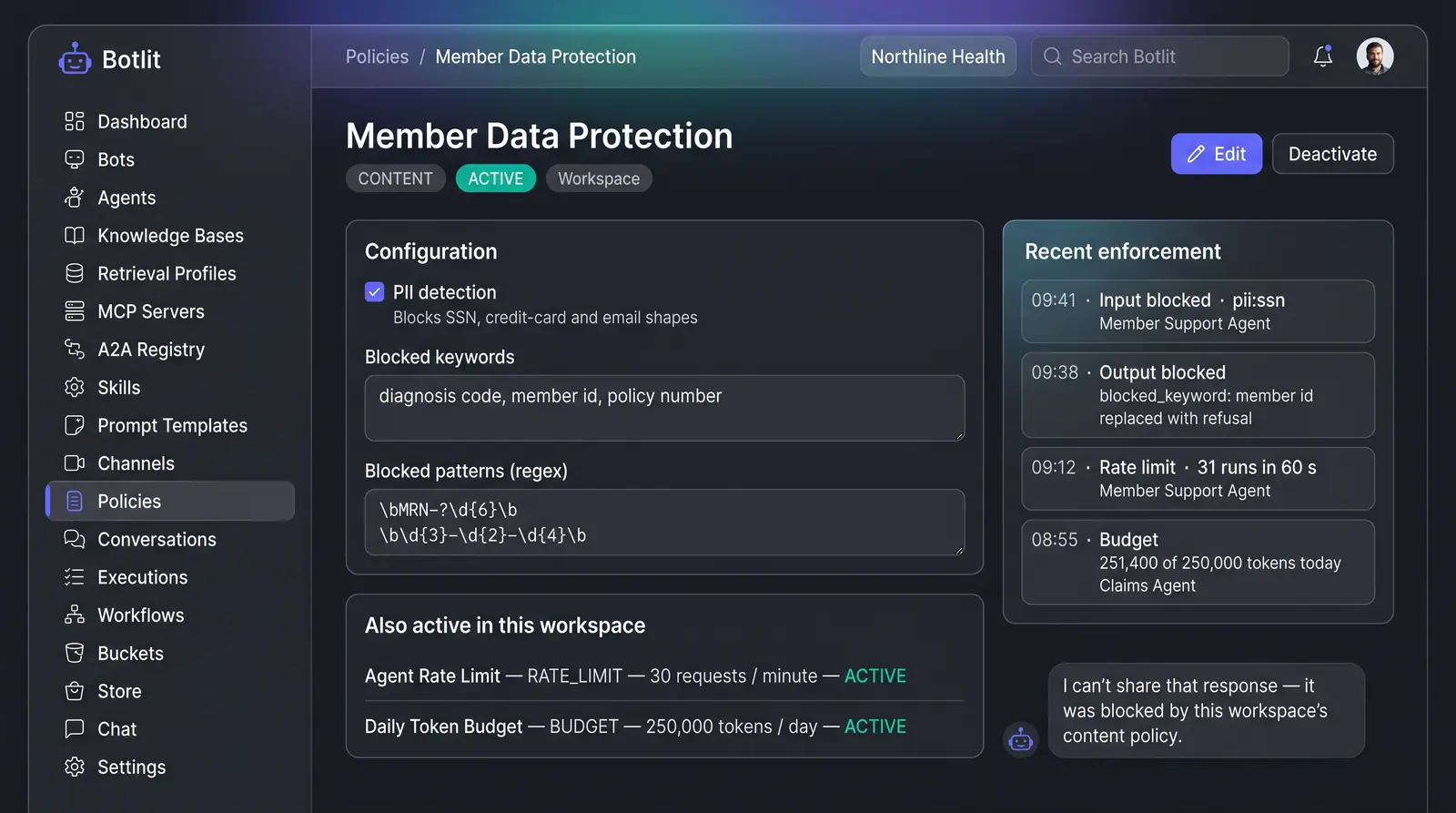
- Workspace-Wide Content Policies and Guardrails: Using Content Policies and Guardrails[2], administrators configure safety rules that apply workspace-wide across every agent. These guardrails monitor both inbound user inputs and outbound model generations. You can enable automated PII detection (blocking email addresses, credit card numbers, and social security numbers), specify lists of blocked keywords, and register custom regex patterns for proprietary identifier shapes. When a violation occurs, the output is blocked and replaced with a standard refusal message, while the event is recorded in a timestamped workspace enforcement feed.
 (opens in a new tab)
Illustration of the concept, not a screenshot of the actual product — Content Policies and Guardrails[2]
(opens in a new tab)
Illustration of the concept, not a screenshot of the actual product — Content Policies and Guardrails[2]
-
Grounded Retrieval with Automatic Refusal: Through Grounded Answers with Cited Sources[3], agents are constrained to answer strictly from connected workspace knowledge bases. When a query falls outside the linked documents, the agent cites what it uses and declines to answer when no source matches.
-
Distributable Policy Packages: To enforce identical safety profiles across multiple workspaces or teams, guardrails and retrieval profiles can be packaged and distributed via the Botlit Template Store[4]. Installing policy bundles in linked mode ensures that any updates made to upstream rules automatically cascade to all dependent bots.
To see how centralized policies and enforcement feeds operate, explore the Content Policies and Guardrails concept[2].
Sources
The pages this answer was drawn from.
- Botlit — Enterprise Agentic AI Platform for AI Agentsbotlit.ai(opens in a new tab)
- Content Policies and Guardrails — Concept | Botlitbotlit.ai(opens in a new tab)
- Grounded Answers with Cited Sources — Concept | Botlitbotlit.ai(opens in a new tab)
- Install Agent Packages from Store | Botlit Use Cases — Botlit Use Casesbotlit.ai(opens in a new tab)