Can a Botlit agent call my own APIs, and who decides which tools it is allowed to use?
Yes, Botlit agents can connect to your own APIs by registering them as Model Context Protocol (MCP) servers in your workspace.
About this answer — Produced by our own assistant on 23 September 2026 from our published documentation. The pages it drew on are linked under the answer. It is generated text, not a statement from a person — where it and a linked page disagree, the page is right.
Answer
Yes, Botlit[1] agents can connect to your own APIs by registering them as Model Context Protocol (MCP) servers in your workspace.
Calling Your APIs
Through the Governed MCP Tool Registry[2], you can register custom MCP server endpoints (such as streamable HTTP endpoints), test server reachability, and discover the tools and resources they expose. Tool discovery, connection testing, and registry management are available today, while live in-chat tool execution is scheduled as part of the agent runtime upgrade.
Who Decides Tool Permissions
Workspace administrators and platform teams control tool access through structured workspace governance rather than hidden configuration files:
- Server Approval: Admins must explicitly register and connect MCP servers in the workspace before any agent can interface with them.
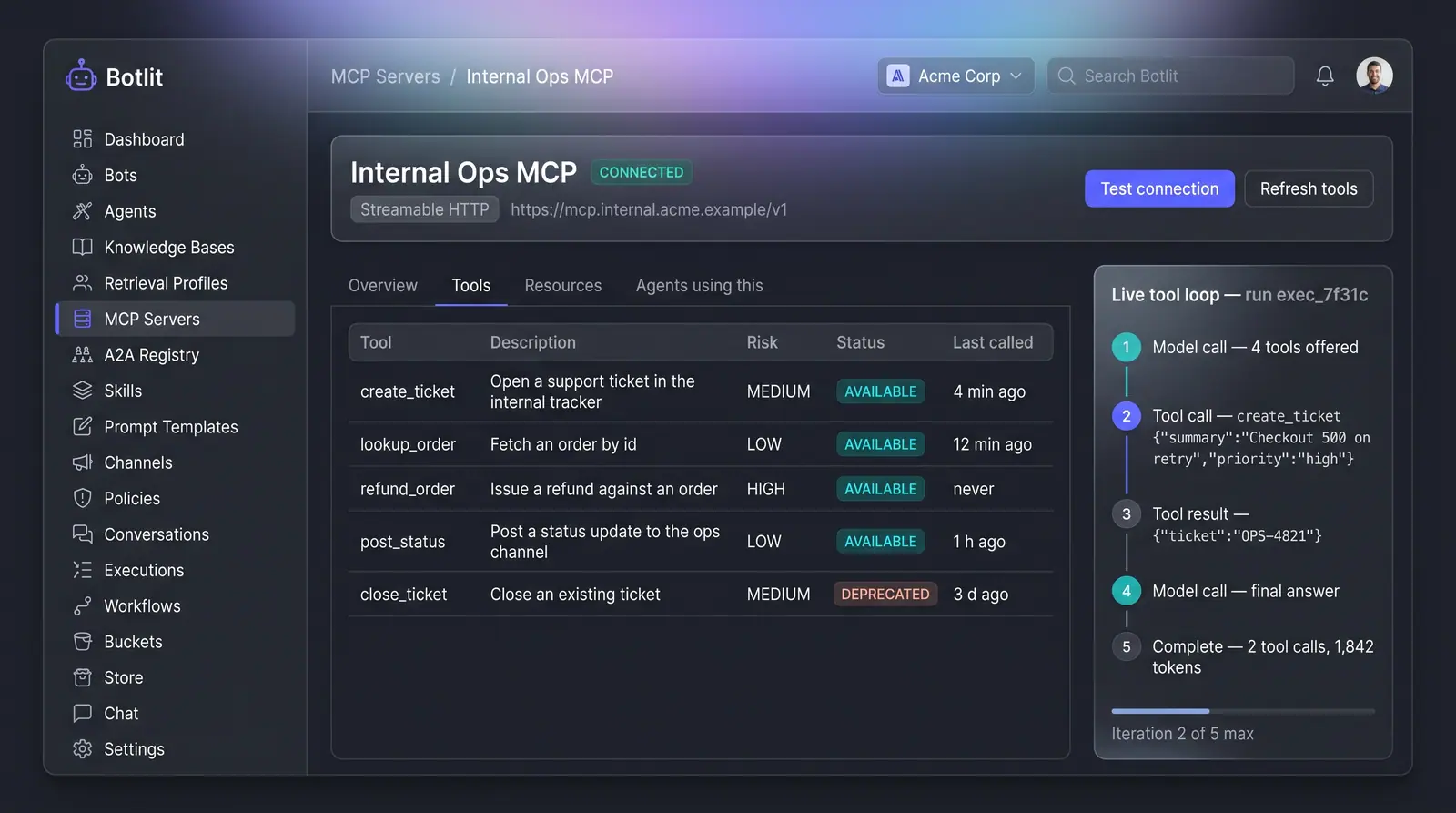
- Risk Classification & Policies: As shown in the MCP Tool Servers and Live Tool Loop[3] concept, teams can classify discovered tools by risk level (low, medium, high) to govern sensitive actions like payments or updates.
- RBAC & Execution Guardrails: Access is governed by workspace-wide RBAC and Credential Management[4], and admins can enforce iteration bounds on tool loops to prevent runaway runs.
 (opens in a new tab)
Illustration of the concept, not a screenshot of the actual product — MCP Tool Servers and Live Tool Loop[3]
(opens in a new tab)
Illustration of the concept, not a screenshot of the actual product — MCP Tool Servers and Live Tool Loop[3]
To see how to catalogue and approve tool surfaces for your agents, explore the Governed MCP Tool Registry guide[2].
Sources
The pages this answer was drawn from.
- Botlit — Enterprise Agentic AI Platform for AI Agentsbotlit.ai(opens in a new tab)
- Governed MCP Tool Registry | Botlit Use Cases — Botlit Use Casesbotlit.ai(opens in a new tab)
- MCP Tool Servers and Live Tool Loop — Concept | Botlitbotlit.ai(opens in a new tab)
- RBAC and Credential Management for APIs | Botlit Use Cases — Botlit Use Casesbotlit.ai(opens in a new tab)